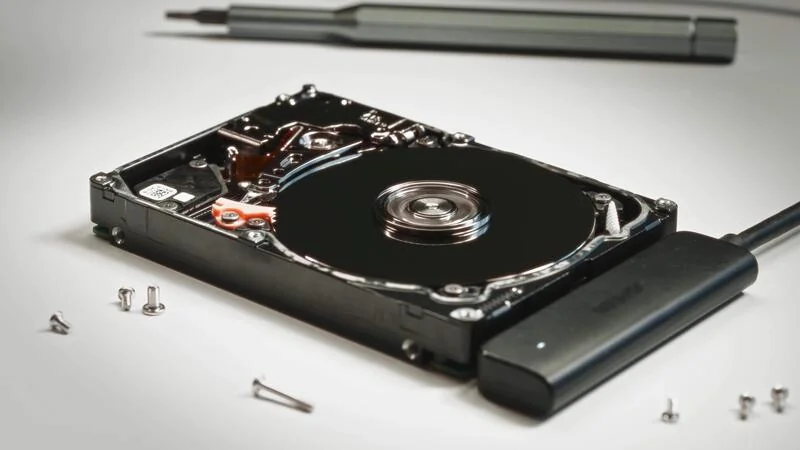
Data Recovery vs Data Migration
Which One Do You Actually Need?
These two services sound alike but they are worlds apart in effort, outcome, and cost. Here is a clear, honest explanation of the difference so you know exactly what your situation calls for.
Two Words That Get Confused Constantly
People often use recovery and migration to mean the same thing, but the difference is enormous and it decides both your cost and your expectations. The single question that separates them is simple. Is the drive healthy, or has it failed?
If your Mac still works and you are moving to a new machine or a bigger drive, you need migration, a routine and affordable transfer. If your drive has failed, your Mac will not turn on, or your files have become unreadable, you need recovery, which is specialized work with no guaranteed outcome and a very different price.
We will never quote you recovery pricing for what is really a simple migration, and we will never pretend a serious recovery is a quick copy. It starts with a free diagnostic to find out exactly which one you are dealing with.
Recovery vs Migration, Side by Side
These are two different services for two different situations, not competitors. Here is how they compare.
Retrieving data from a drive or device that has failed, such as a dead logic board, a damaged drive, or a Mac that will not turn on.
Copying your files, apps, and settings from a healthy, working drive to another drive or a new Mac.
The drive or Mac is damaged, unresponsive, or not being recognized. The data is stuck and cannot be read normally.
The drive is fully working and readable. Nothing is broken, you are simply moving to a new home for the data.
Quoted case by case. Depending on the failure it can range from several hundred dollars into the thousands, and severe cases run higher.
A modest, predictable service, often bundled with a new setup or an SSD upgrade. Far cheaper than recovery.
Varies widely with the type of failure. Complex physical or board-level cases take longer because the work is delicate.
Usually quick and predictable, often completed the same day depending on the amount of data.
Never guaranteed. Some cases recover fully, some partially, and some are not recoverable. We give you honest odds up front.
Reliable and complete when the source drive is healthy. Your setup arrives intact on the new drive or Mac.
Specialized diagnostics, sometimes board-level micro-soldering and delicate handling of damaged storage.
A routine, well-understood transfer process using healthy hardware.
Data Recovery
Retrieving data from a drive or device that has failed, such as a dead logic board, a damaged drive, or a Mac that will not turn on.
Data Migration
Copying your files, apps, and settings from a healthy, working drive to another drive or a new Mac.
Data Recovery
The drive or Mac is damaged, unresponsive, or not being recognized. The data is stuck and cannot be read normally.
Data Migration
The drive is fully working and readable. Nothing is broken, you are simply moving to a new home for the data.
Data Recovery
Quoted case by case. Depending on the failure it can range from several hundred dollars into the thousands, and severe cases run higher.
Data Migration
A modest, predictable service, often bundled with a new setup or an SSD upgrade. Far cheaper than recovery.
Data Recovery
Varies widely with the type of failure. Complex physical or board-level cases take longer because the work is delicate.
Data Migration
Usually quick and predictable, often completed the same day depending on the amount of data.
Data Recovery
Never guaranteed. Some cases recover fully, some partially, and some are not recoverable. We give you honest odds up front.
Data Migration
Reliable and complete when the source drive is healthy. Your setup arrives intact on the new drive or Mac.
Data Recovery
Specialized diagnostics, sometimes board-level micro-soldering and delicate handling of damaged storage.
Data Migration
A routine, well-understood transfer process using healthy hardware.
Which One Fits Your Situation
A quick way to tell which service you are really looking for.
You Likely Need Data Recovery
- Your Mac will not turn on, or the drive is no longer recognized.
- You hear clicking or unusual noises, or the machine suffered liquid or physical damage.
- Files or folders have become corrupt, missing, or unreadable.
- A logic board failure is keeping you from reaching soldered storage.
- You have no recent backup and the data on the failed device matters.
You Likely Need Data Migration
- Your current Mac still works and you are moving to a new one.
- You are upgrading to a larger or faster SSD and want everything moved over.
- You want your files, apps, and settings transferred without a fresh start.
- Your old drive is healthy and simply being retired.
- You have a working backup you want restored onto a new machine.
Why Recovery Costs What It Does
Migration is predictable because the drive is healthy. The data is right there and readable, so moving it is a routine transfer. Recovery is a different animal. The data is trapped behind a failure, and the effort to reach it depends entirely on what broke.
A drive that still spins up but has logical errors sits at the lower end. A drive with physical damage, or a Mac where the storage is soldered to a failed logic board, can require board-level micro-soldering and painstaking, delicate work just to get the data to a readable state. That is why industry recovery pricing spans from several hundred dollars into the thousands, and why no honest shop quotes it sight unseen.
We always diagnose first, tell you honestly what your odds look like, and quote before any work begins. You are never surprised by the bill.
The Best Recovery Is the One You Never Need
A current backup turns a disaster into an inconvenience. When your data lives in a Time Machine backup or the cloud, a failed drive becomes a simple restore or migration rather than a costly, uncertain recovery. It is the single most valuable habit for any Mac owner.
If your Mac is aging or showing warning signs, or you simply are not sure your backup is working, bring it in. We will check the health of your drive, help you get a reliable backup in place, and handle a clean migration or recovery if you need one.
Do not take our word for it, take theirs
3 days ago
I did not visit but instead made an inquiry over the phone. They were super helpful kind and patient. Greatly appreciate…
Read more
20 days ago
I bought a used MacBook Pro off eBay. It had a nice configuration at a good price. However, the logic board went down on…
Read more
1 month ago
Loved my experience, it was fast and efficient. Highly recommend!
1 month ago
Excellent service with an issue I was having on a corrupted Apple Photos library on an external RAID array. Took just a …
Read more
1 month ago
I closed my MacBook with an earring in the corner and the screen was shot, Jean was so great at getting the parts he nee…
Read more
2 months ago
I found WarriorMac LLC online after contacting 2 computer stores and an Apple store agent who all advised me to discard …
Read more
2 months ago
Best choice we made to go to Warriormac to repair a macbook pro. Thought all the data was lost along with the computer d…
Read more
2 months ago
Jean was amazing and fast with replacing our iMac screen and other laptop fixes!
3 months ago
Outstanding Service and Professionalism! Jean-Andre went above and beyond to fix my MacBook Pro. His attention to detail…
Read more
3 months ago
Count yourself lucky if your Mac needs to be worked on and you live in the same city as Jean at WarriorMac. Not only is …
Read more
4 months ago
We have two Mac Books. One has not operated properly for years and was simply left in a storage drawer. The other would …
Read more
6 months ago
Jean-Andre is a true life saver! I will forever recommend WarriorMac LLC to all my loved ones, friends, coworkers, etc. …
Read more
5 months ago
WarriorMac and Jean-Andre go the extra mile on every repair. He treats your Macbook like his own and is not satisfied un…
Read more
6 months ago
Fast, excellent service! Jean repaired my MacBook Pro and had it back to me in just a day. His work is top-notch. For an…
Read more
6 months ago
WarriorMac is absolutely fantastic. My water-damaged MacBook Pro is now working like new again thanks to their skill and…
Read more
Frequently Asked Questions
Not Sure Which One You Need?
Bring your Mac in or ship it to us for a free diagnostic. We will tell you honestly whether you need a simple migration or true recovery, and quote it before any work begins.
Have a Question About Your Data?
Send us a message and we will get back to you within a few hours.