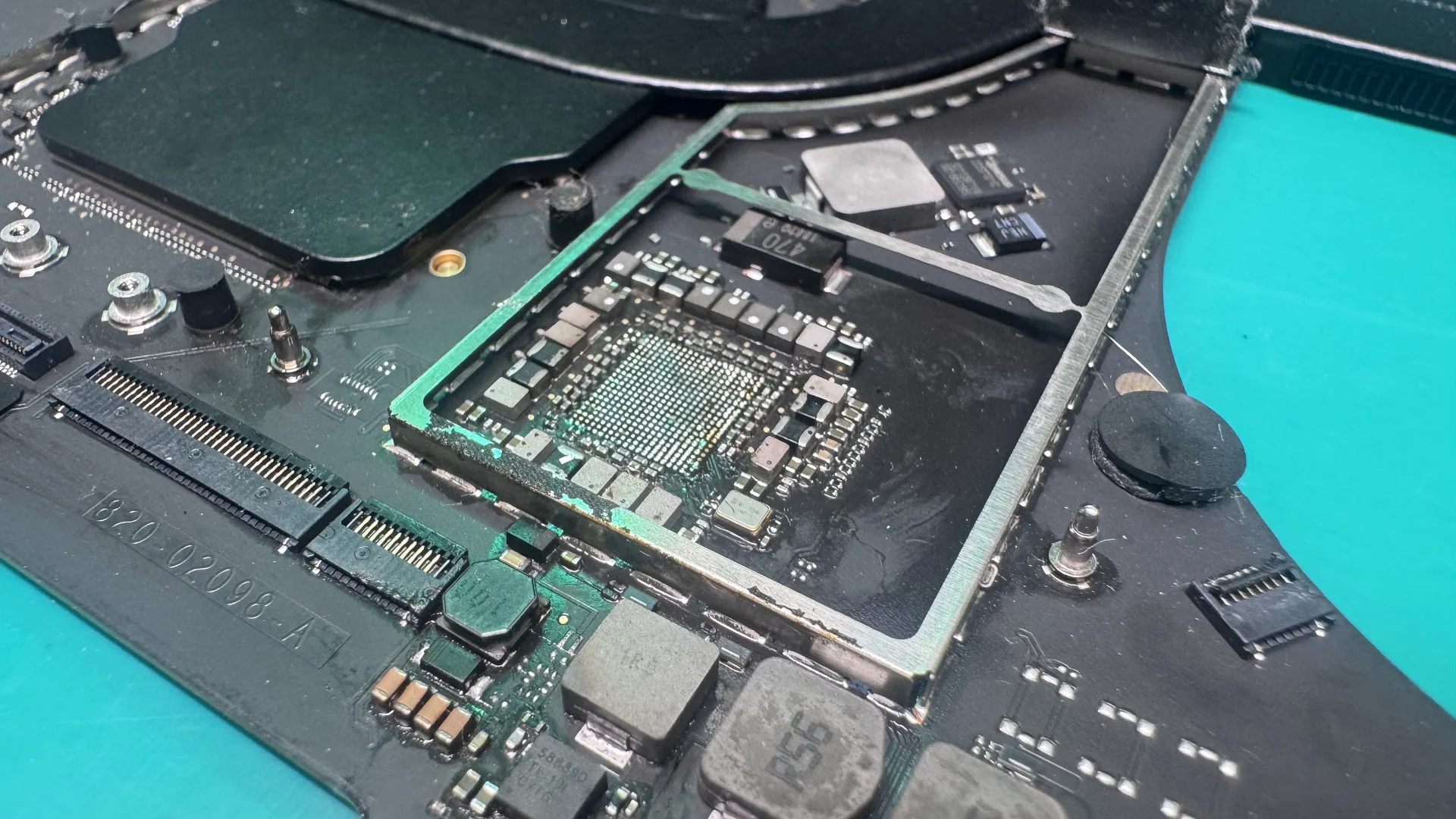
MacBook Liquid Damage Repair Service
Expert MacBook liquid damage repair in Tampa, FL
Ready to Fix Your Mac?
Start your repair in minutes. Choose the option that works best for you — ship it to us from anywhere in the U.S., or drop it off in person at our Tampa location.
Not sure which to choose? Start here and we’ll guide you.
Liquid Damage: Restore Your Device to Full Function
Expert MacBook liquid damage repair in Tampa, FL
MacBook liquid damage repair at WarriorMac starts from $129. Instead of replacing the entire logic board like Apple does, our Apple Certified technician ultrasonically cleans the board, neutralizes corrosion at the component level, and repairs only the damaged parts, keeping your data intact and your cost a fraction of a board swap. Liquid damage is the second most common issue we see in our repair shop, and recovery rates are highest when treatment begins within the first 24 to 48 hours.
Every liquid damage case starts with a free diagnostic and a clear, no-obligation repair quote. We handle everything from minor coffee spills affecting only the keyboard to severe water submersion requiring full board-level micro-soldering. Walk-in service in Tampa and nationwide mail-in available.
What is Liquid Damage?
Liquid damage refers to the exposure of your MacBook to any liquid that interferes with the internal electronics. Even a small amount of liquid can short-circuit sensitive components on the logic board, battery, or keyboard. Unlike software issues, liquid damage affects hardware directly and requires professional attention.
Signs Your MacBook Has Liquid Damage
Detecting liquid damage early can save your MacBook from permanent failure. Watch for these key indicators:
MacBook Won't Power On
If your MacBook suddenly fails to turn on after a spill, it's likely that liquid has reached critical components on the logic board or power management system.
Keyboard or Trackpad Malfunctions
Sticky or unresponsive keys, erratic trackpad behavior, or keys that register multiple presses can indicate liquid infiltration beneath the top case.
Strange Display Behavior
Liquid can affect your MacBook's screen and graphics system, causing flickering, distortion, color anomalies, or complete blank screens.
Corrosion and Burn Marks
Over time, liquid residue causes corrosion on the logic board and other internal parts. Green or white deposits on components are telltale signs of liquid exposure.
Random Shutdowns or Reboots
Unexpected shutdowns, freezing, or restarts often indicate liquid-induced electrical shorts on the logic board or power regulation circuits.
Overheating
Liquid damage can disrupt the cooling system or power regulation, causing the MacBook to overheat even under normal, light use.
Why Immediate Action Matters
Time is critical after a liquid spill. MacBooks are not waterproof, and prolonged exposure increases the risk of irreversible damage.
Prevents Permanent Damage
The longer liquid sits on the logic board, the more corrosion occurs. Minutes matter.
Increases Repair Success
Early intervention allows technicians to clean and restore components before irreversible failure.
Protects Your Data
Hard drives and SSDs can fail if liquid reaches critical circuits, making data recovery significantly harder.
Commonly Affected Components
When a MacBook experiences liquid damage, the following components are most vulnerable:
1. Logic Board (Motherboard)
The central hub of the MacBook is highly sensitive to liquid. Damage here can affect the entire device, from power delivery to data processing.
2. Battery & Power Management
Spills can cause short circuits in the battery and charging circuitry, preventing the MacBook from charging or powering on entirely.
3. Keyboard & Trackpad
Liquids seep under keys causing corrosion, sticky mechanisms, and ghost inputs. The trackpad flex cable is particularly vulnerable.
4. Display & Screen Assembly
Liquid can affect backlighting, graphics output through the LVDS cable, or the entire display system including the T-CON board.
5. Storage Drives
SSDs are more resilient than traditional HDDs, but severe liquid exposure can still cause data loss through controller chip damage.
Steps to Take Immediately After a Liquid Spill
Follow these steps to minimize damage and maximize recovery chances:
Turn Off Immediately
Power off the MacBook right away. Do NOT try to check if it still works. Powering off prevents short circuits and further damage to internal components.
Unplug All Power Sources
Disconnect the charger and any peripherals (USB drives, monitors, etc.) to reduce electrical hazards and prevent current flow through wet circuits.
Dry the Exterior
Use a soft, absorbent cloth to remove excess liquid without shaking the device. Tilt gently to let liquid drain from ports. Do NOT use a hair dryer.
Do Not Attempt DIY Repairs
Opening the MacBook without proper tools, anti-static equipment, or experience can worsen the damage. Rice does NOT work and can introduce debris.
Seek Professional Repair
Time-sensitive intervention by a skilled technician is crucial. The sooner we can clean and dry the internals, the higher the chances of full recovery.
Professional Liquid Damage Repair Process
At WarriorMac, professional repair is the safest and most effective way to restore a liquid-damaged MacBook.
Initial Assessment
Technicians assess the extent of the damage using Apple Diagnostics (MRI), checking components such as the logic board, battery, keyboard, and display for liquid contact indicators.
Disassembly & Ultrasonic Cleaning
The MacBook is carefully disassembled and affected components are cleaned using our professional ultrasonic cleaning machine with specialized solutions to dissolve corrosion and remove residues.
Component-Level Repair
Damaged components like power ICs, capacitors, or keyboard connectors are repaired or replaced using micro-soldering. We fix at the chip level rather than replacing entire boards.
Testing & Quality Assurance
The MacBook undergoes comprehensive testing using Apple Diagnostics to ensure all functions -- Wi-Fi, graphics, battery, keyboard, trackpad, and ports -- are fully operational.
Data Recovery
If liquid damage threatens your stored data, our technicians prioritize recovery using specialized tools and clean-room techniques to prevent permanent loss.
Return & Warranty
Your restored MacBook is returned with a 1-year limited warranty on all repairs, covering both parts and labor for complete peace of mind.
Cost of Liquid Damage Repair
The cost varies depending on the severity of the spill, the components affected, and the MacBook model. Repair is almost always cheaper than replacement.
All repairs include a free diagnostic assessment. Final pricing depends on specific damage found during inspection.
Please note: All prices shown are estimates provided only to give you an approximate idea of the cost. Final pricing varies from one machine to another and depends on the severity of the issue. These price ranges do not include labor. We always provide a free diagnostic and an exact quote before any work begins.
DIY vs Professional Repair
While some MacBook owners may consider DIY solutions, professional repair is strongly recommended:
DIY Risks
Professional Advantages
Preventing Liquid Damage
While accidents happen, taking precautions can minimize risk:
Use Protective Covers
Keyboard covers and waterproof cases can shield against accidental spills.
Avoid Liquids Nearby
Keep beverages away from your MacBook. Simple precautions prevent 90% of liquid damage.
Keep Devices Elevated
Avoid placing MacBooks near table edges or surfaces where liquid can easily reach.
Regular Maintenance
Routine cleaning and inspections can help spot minor corrosion before it escalates.
Choosing the Right Repair Service
When selecting a liquid damage repair service, consider the following:
Expertise in MacBook Repairs
Look for technicians trained in Apple hardware and micro-soldering.
Warranty & Service Guarantee
Ensure the service provides warranties for repaired components.
Customer Reviews & Reputation
Check testimonials to verify professionalism and reliability.
Advanced Diagnostic Tools
Services should offer specialized equipment for identifying liquid damage.
Transparent Pricing
Reputable services provide detailed quotes upfront without hidden fees.
Benefits of Professional Repair
Cost-Effective
Cheaper than buying a new MacBook
Data Preservation
Professional data protection
Extended Device Life
Full performance restoration
Eco-Friendly
Reduces electronic waste
Peace of Mind
1-year warranty on repairs
Fast Turnaround
Same-day service available
Frequently Asked Questions
Conclusion
Liquid damage is one of the most time-sensitive Mac repairs, and acting fast dramatically improves the odds of a full recovery. Professional cleaning, corrosion treatment, and component-level repair can save both your MacBook and the data stored on it, often for a fraction of the cost of a replacement.
The longer a liquid-damaged device sits powered on or uncleaned, the more corrosion spreads across the logic board. A professional diagnostic identifies exactly what needs attention and gives you a clear, honest assessment before any work begins.
If your MacBook has suffered liquid damage, don't wait. Contact WarriorMac today for a free diagnostic and get your device back on track.
Get Your MacBook Restored Today
Whether your MacBook experienced a coffee spill, water exposure, or soda mishap, professional repair services can save your device and data. With proper care, timely intervention, and professional expertise, a liquid-damaged MacBook can return to near-new performance.