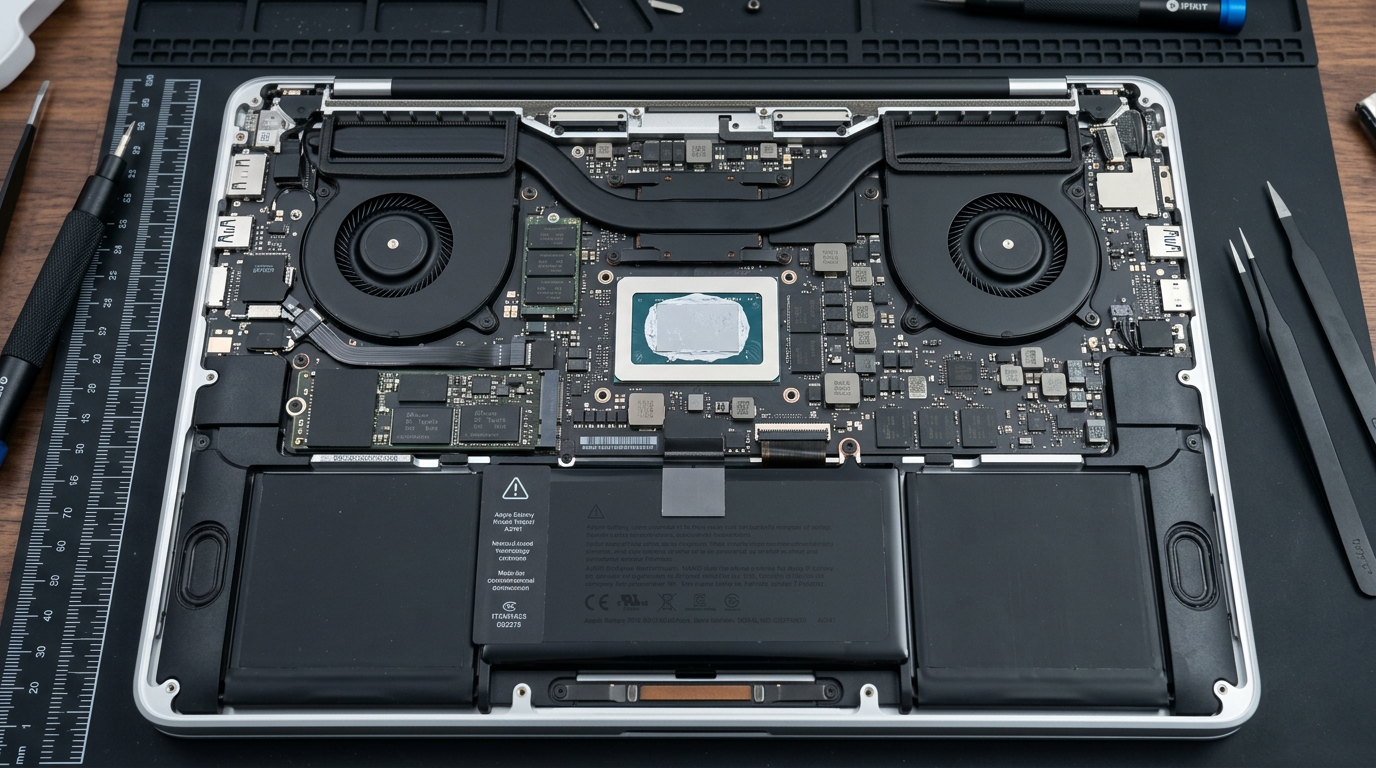
MacBook Running Hot?
Loud fans, thermal shutdowns, burning-hot bottom case. We restore proper cooling.
Quick Diagnosis
MacBook overheating is typically caused by dried-out thermal paste, clogged fans or heatsinks, a runaway software process consuming excessive CPU, or a failed fan. Over time, the factory thermal paste dries out and loses its ability to transfer heat from the CPU/GPU to the heatsink, causing temperatures to climb and fans to run at maximum speed.
Common Causes
Here are the most frequent reasons for this problem, ranked by how often we see each one.
Dried-out thermal paste
CommonThe thermal compound between the CPU/GPU and heatsink dries out after 3 to 5 years, losing its heat-transfer ability. This is the most common hardware cause of overheating in older MacBooks.
Dust-clogged fans and heatsinks
CommonDust, pet hair, and debris accumulate inside the fan blades and heatsink fins, reducing airflow and cooling efficiency.
Runaway software process
LikelyA malfunctioning app, browser extension, or background process can peg the CPU at 100%, generating excessive heat. Check Activity Monitor for high-CPU processes.
Failed or slow fan
PossibleA fan motor that has worn out or slowed down cannot move enough air to cool the system, even if the thermal paste and heatsink are fine.
Blocked air vents
PossibleUsing the MacBook on a bed, pillow, or soft surface that covers the intake and exhaust vents traps heat inside.
Try These Steps First
Before bringing your Mac in, try these diagnostic steps at home.
Check Activity Monitor
Open Activity Monitor (Applications > Utilities) and sort by CPU. If a process is using 90%+ CPU, that is likely causing the heat. Force quit it and see if temperatures drop.
Listen to the fans
If the fans are loud and running constantly, the Mac is actively trying to cool itself. If you hear grinding, clicking, or rattling, the fan motor may be failing.
Check ambient temperature
MacBooks are designed to operate between 50 and 95 degrees Fahrenheit (10 to 35 Celsius). Using one in a very hot environment contributes to overheating.
Ensure proper ventilation
Use the MacBook on a hard, flat surface. A laptop stand that elevates it can improve airflow significantly.
What WarriorMac Does Differently
We perform a complete thermal service: full disassembly, removal of old thermal paste, application of premium thermal compound, thorough cleaning of fans and heatsinks, and fan motor testing. For failed fans, we replace them with genuine Apple fan assemblies. The result is significantly lower operating temperatures, quieter fan operation, and improved performance.
Repair Options & Pricing
Thermal paste replacement
Removal of old dried paste, cleaning of CPU/GPU die and heatsink, application of premium thermal compound.
Fan cleaning and service
Full disassembly, fan blade and heatsink cleaning, airflow path clearing.
Fan replacement
Replacement of a failed or noisy fan with a genuine Apple fan assembly.
Complete thermal service
Thermal paste replacement, fan cleaning, heatsink service, and temperature testing in one visit.
Frequently Asked Questions
Why is my MacBook so hot?
How much does thermal paste replacement cost?
Can overheating damage my MacBook permanently?
Is it normal for a MacBook to get hot?
Related Services
Still Not Fixed?
Bring it to us or ship it in. Free diagnosis, no-fix-no-fee guarantee, 25 years of experience.