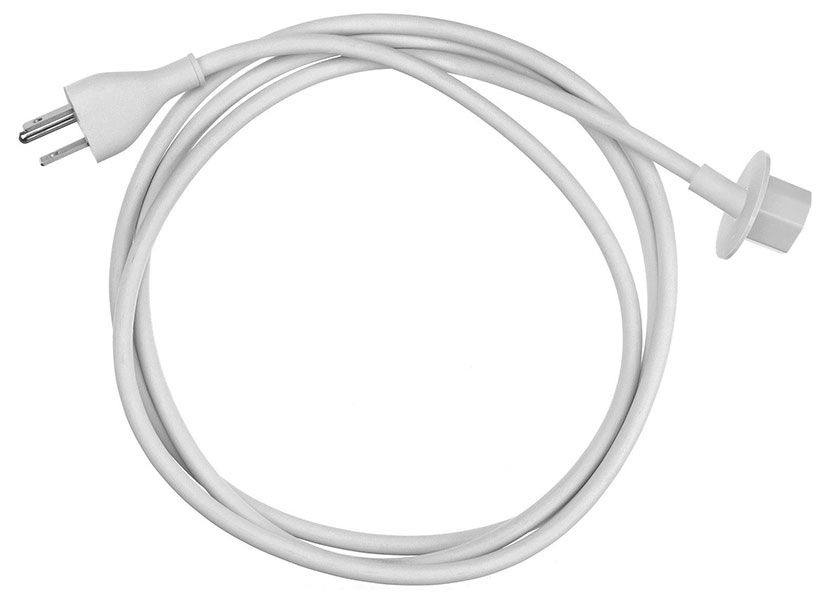
Power Cord
Apple Part Number: 923-0285
6-Month Warranty
Full replacement
Fast Shipping
1-2 business days
Tested & Verified
QA before ship
Expert Help
Install guidance
Compatibility
| Model | Order # | Model # | EMC | Identifier | Processor |
|---|---|---|---|---|---|
| iMac (21.5-inch, 2017) | MMQA2LL/A | A1418 | 3068 | iMac18,1 | 2.3 GHz Intel Core i5 |
| iMac (Retina 5K, 27-inch, Mid 2015) | MF885LL/A | A1419 | 2806 | iMac15,1 | 3.3 GHz Intel Core i5 |
| iMac (21.5-inch, Mid 2014) | MF883LL/A | A1418 | 2805 | iMac14,4 | 1.4 GHz Intel Core i5 |
| iMac (21.5-inch, Early 2013) | ME699LL/A | A1418 | 2545 | iMac13,1 | 3.3 GHz Intel Core i3 |
| iMac 21.5-inch 4K 2017 | A1418 | iMac18,2 | Intel Core i5/i7 | ||
| iMac 21.5-inch 4K 2019 | A2116 | iMac19,2 | Intel Core i3/i5/i7 | ||
| iMac 21.5-inch 4K Late 2015 | A1418 | iMac16,2 | Intel Core i5 | ||
| iMac 21.5-inch Late 2013 | A1418 | iMac14,1 | Intel Core i5/i7 | ||
| iMac 21.5-inch Late 2015 | A1418 | iMac16,1 | Intel Core i5 | ||
| iMac 27-inch 5K 2017 | A1419 | iMac18,3 | Intel Core i5/i7 | ||
| iMac 27-inch 5K 2019 | A2115 | iMac19,1 | Intel Core i5/i7/i9 | ||
| iMac 27-inch 5K 2020 | A2115 | iMac20,1 / iMac20,2 | Intel Core i5/i7/i9 | ||
| iMac 27-inch 5K Late 2015 | A1419 | iMac17,1 | Intel Core i5/i7 | ||
| iMac 27-inch Late 2012 | A1419 | iMac13,2 | Intel Core i5/i7 | ||
| iMac 27-inch Late 2013 | A1419 | iMac14,2 | Intel Core i5/i7 |
Shop all parts for this Mac
About this part
The Power Cord (Apple part number 923-0285) is a genuine Apple part that fits the iMac (21.5-inch, 2017), iMac (Retina 5K, 27-inch, Mid 2015), iMac (21.5-inch, Mid 2014) and 12 other models. I/O and audio parts handle ports, speakers, microphones, and headphone connections.
Before you order, match the model identifier on your Mac (Apple menu, About This Mac, System Report) to one of the identifiers listed for this part: iMac18,1, iMac15,1, iMac14,4, iMac13,1, iMac18,2, iMac19,2 and 9 other models.
Signs the I/O or audio part needs replacing
- Ports that do not detect devices or charge
- Distorted, crackling, or silent speakers
- Microphone not picking up sound on calls
- Headphone jack stuck in headphone mode
Not sure the I/O or audio part is the real cause? We diagnose the Mac before replacing anything, and we can install this genuine Apple part for you through our iMac repair service, in our Tampa shop or by mail-in repair from anywhere in the US.

Free Apple Repair Manuals & Reference Guides
Browse step-by-step service manuals, model specs and screw-placement charts for Mac, iPhone and iPad.
Popular Model Guides